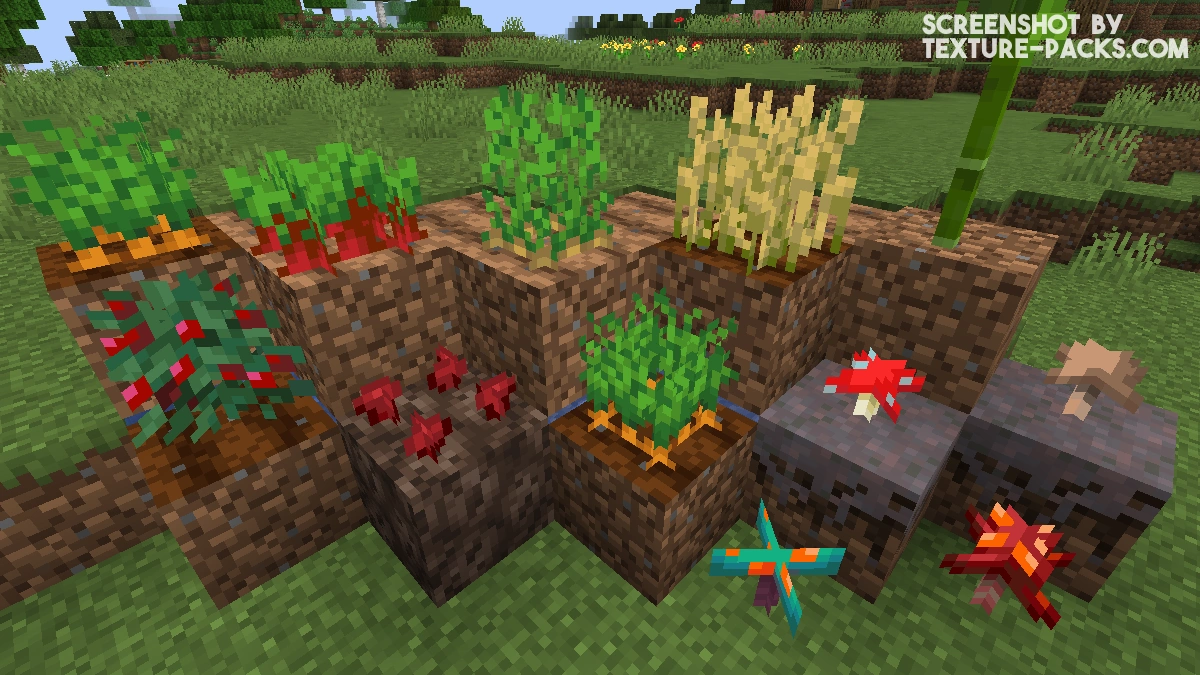
A simple but super cool pack is the Crops 3D texture pack for Minecraft. It transforms your farms with their fruit and vegetable plants into more realistic 3D blocks while keeping the vanilla style. The overall design stays the same, just with small 3D improvements. You will notice the changes right after installing it, as soon as your crops start to grow. Every growth stage is now much more detailed, and it is actually fun to watch the plants as they develop.
Crops 3D is a great choice if you enjoy the classic Minecraft without many mods and only want minimal changes. Since this pack only improves farming, it works perfectly with other textures like Fresh Animations, Better Leaves, or Xali’s Enchanted Books. All three also only change specific parts of the big Minecraft world. Just install them together and the gameplay will get new features exactly where they are needed.
The most impressive part is the carrots. When they are ready to harvest, they already stick halfway out of the ground. The same happens with beetroots, which use the same 3D model but in a different color. Wheat is the least exciting, as it looks almost the same as before. This could have used more detail, like in the Classic 3D texture pack. Better done is the sugar cane, where the nodes on the stalk stand out more and fit perfectly with the pack’s style. Small mushrooms have also been redesigned, which you can find in caves and other dark areas. The melons are also worth mentioning because while they are growing, they now amusingly hang from their stem in the air.
Overall, the Crops 3D resource pack makes your crops look much better and gives you more decoration options. The plants are perfect for small garden beds in front yards or as indoor decorations after you download them. On top of that, the resource pack is easy on your FPS, as we found in our tests, because the performance is very similar to vanilla. That makes sense since only a few textures are made 3D. The resolution stays at 16×16, which also helps. At first, the low resolution might not sound exciting, but it is important so that the Crops 3D pack blends in seamlessly with the other blocks.
If you like these small improvements for Minecraft, you should also check out Stay True, BetterVanillaBuilding, and New Default+. All three change Minecraft in their own subtle way and are more extensive than Crops 3D, which only turns the 2D plant textures into 3D models.
Crops 3D was released on February 24, 2020 and is compatible with these Minecraft versions: 26.1.2 - 26.1.1 - 26.1 - 1.21.11 - 1.21.10 - 1.21.9 - 1.21.8 - 1.21.7 - 1.21.6 - 1.21.5 - 1.21.4 - 1.21.3 - 1.21.2 - 1.21.1 - 1.21 - 1.20.6 - 1.20.5 - 1.20.4 - 1.20.3 - 1.20.2 - 1.20.1 - 1.20 - 1.19.4 - 1.19.3 - 1.19.2 - 1.19.1 - 1.19 - 1.18.2 - 1.18.1 - 1.18 - 1.17.1 - 1.17 - 1.16.5 - 1.16.4 - 1.16.3 - 1.16 - 1.15.2 - 1.15 - 1.14.4 - 1.14 - 1.13.2 - 1.13 - 1.12.2 - 1.12 - 1.11.2 - 1.11
Video & Screenshots


Comparison
Use our comparison tool to compare the Minecraft default pack with Crops 3D.

How To Install Crops 3D Texture Pack
Here’s a tutorial on installing Crops 3D in Minecraft Java Edition. If you’re using Minecraft Bedrock Edition and the pack is available for Bedrock/MCPE, you can simply click on the downloaded file to install it.
- Download and install OptiFine, as it is required by most texture packs.
- Download the Crops 3D texture pack for Minecraft from the file section below. Pick the file that matches your Minecraft edition and version.
- Launch Minecraft.
- Click "Options" on the main menu.
- In the options, go to the submenu “Resource Packs”.
- Click "Open Pack Folder" at the bottom left to see a folder titled "resourcepacks".
- Put the downloaded ZIP file into your "resourcepacks" folder. Or, just drag and drop it into the Minecraft window to add the pack.
- You will see the pack on the left side of the resource pack selection menu. Unzip the file if you can't see the pack.
- Hover over the pack thumbnail and click the arrow pointing right. If the game notifies you that the pack is made for a newer or older Minecraft version, simply click “Yes” to proceed. Most textures will still work.
- Click "Done" and all assets have been loaded.
Crops 3D Texture Pack Download
[16x] [26.1.x] Download Crops 3D Reforged Texture Pack
[16x] [1.21.11 – 1.21.9] Download Crops 3D Reforged Texture Pack
[16x] [1.21.8 – 1.21.5] Download Crops 3D Reforged Texture Pack
[16x] [1.21.4] Download Crops 3D Reforged Texture Pack
[16x] [1.21.3 – 1.21.2] Download Crops 3D Reforged Texture Pack
[16x] [1.21.1 – 1.21] Download Crops 3D Reforged Texture Pack
[16x] [1.19.X] Download Crops 3D Texture Pack
[16x] [1.18.X] Download Crops 3D Texture Pack
[16x] [1.17.X] Download Crops 3D Texture Pack
[16x] [1.16.X] Download Crops 3D Texture Pack
[16x] [1.15.X] Download Crops 3D Texture Pack
[16x] [1.14.X – 1.13.X] Download Crops 3D Texture Pack
[16x] [1.12.X – 1.11.X] Download Crops 3D Reforged Texture Pack

I think it’s really cool but I haven’t tried it yet
where can i download it on bedrock
It’s currently not available for Bedrock or MCPE.