Entity Texture Features, or just ETF, is a mod that handles random mob textures and emissive effects for texture packs, without needing OptiFine. One thing worth saying upfront: if you play without texture packs, you don’t need ETF. The mod doesn’t add anything visible on its own. It only matters when a texture pack uses features like glowing mob eyes or randomized mob variants and then it matters a lot.
These are the popular texture packs we’ve tested directly with ETF: Fresh Animations, Fresh Moves, Tissou’s Zombie Pack, Better Animals, Patrix, and Elytras+. In every case the visual result was identical to what we would have seen with OptiFine and there was no noticeable difference. Some texture packs ship with multiple texture files for the same mob. Tissou’s Zombie Pack for example includes dozens of zombie variants that spawn randomly throughout the world. Without ETF, Minecraft ignores all of them and every zombie looks identical. Same goes for emissive textures. That are files that make certain parts of a mob glow independently of the surrounding light level. Spider eyes, enderman eyes, glowing armor trims. ETF is what tells the game to actually render those.
It also handles blinking animations that the Fresh Animations texture pack uses on mob eyes, and extends to player skin features like emissive skin regions. Running Fresh Animations also worked without the white eye bug that’s commonly reported with other setups. But with Patrix, some mobs like the guardian and turtle can appear glitched. Everything else rendered correctly. FPS-wise, we couldn’t measure any difference compared to running without ETF because it’s just a lightweight mod.
In comparison with OptiFine, there are some big differences. OptiFine still works if you’re on an oldschool Forge setup and don’t care about modern performance mods like Sodium. But OptiFine is not compatible with Fabric, NeoForge and Quilt, and honestly the codebase hasn’t aged well. The modular approach with running ETF for textures, Entity Model Features (EMF) for models, and Continuity for connected blocks is more setup work upfront compared to just installing OptiFine. That’s a fair criticism, but the advantages outweigh that. Each mod does one thing well, they don’t interfere with performance mods, and the ecosystem has matured enough that it’s not the headache it used to be.
What actually sold us on ETF specifically is that the developer Traben has consistently updated the mod within a few days of a new Minecraft version releasing. For a site like Texture-Packs.com where packs need to be tested on new versions quickly, that reliability matters more than almost anything else. All in all, it’s a helpful mod for additional texture pack features. By the way, ETF and EMF are by the same developer and work together, but they’re separate downloads.
Entity Textures Features was first published on January 17, 2022 and is compatible with these Minecraft versions: 26.2 - 26.1.2 - 26.1.1 - 26.1 - 1.21.11 - 1.21.10 - 1.21.9 - 1.21.8 - 1.21.7 - 1.21.6 - 1.21.5 - 1.21.4 - 1.21.3 - 1.21.2 - 1.21.1 - 1.21 - 1.20.6 - 1.20.5 - 1.20.4 - 1.20.3 - 1.20.2 - 1.20.1 - 1.20 - 1.19.4 - 1.19.3 - 1.19.2 - 1.19.1 - 1.19 - 1.18.2 - 1.18.1 - 1.18 - 1.17.1 - 1.16.5
Screenshots
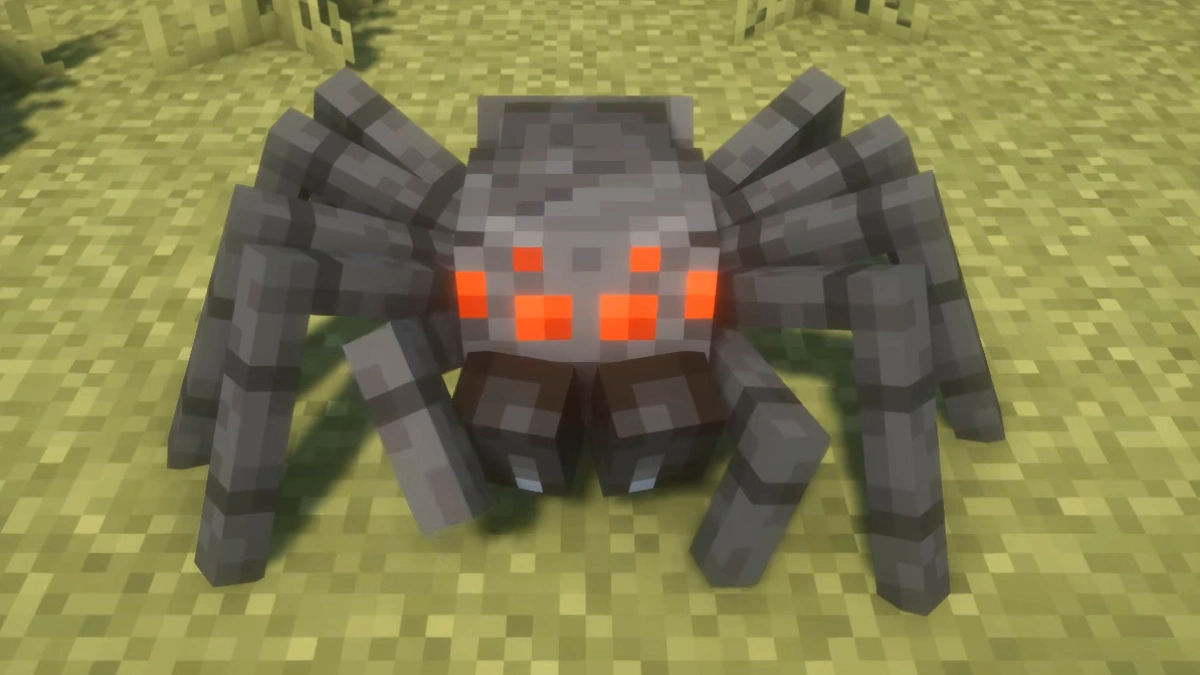
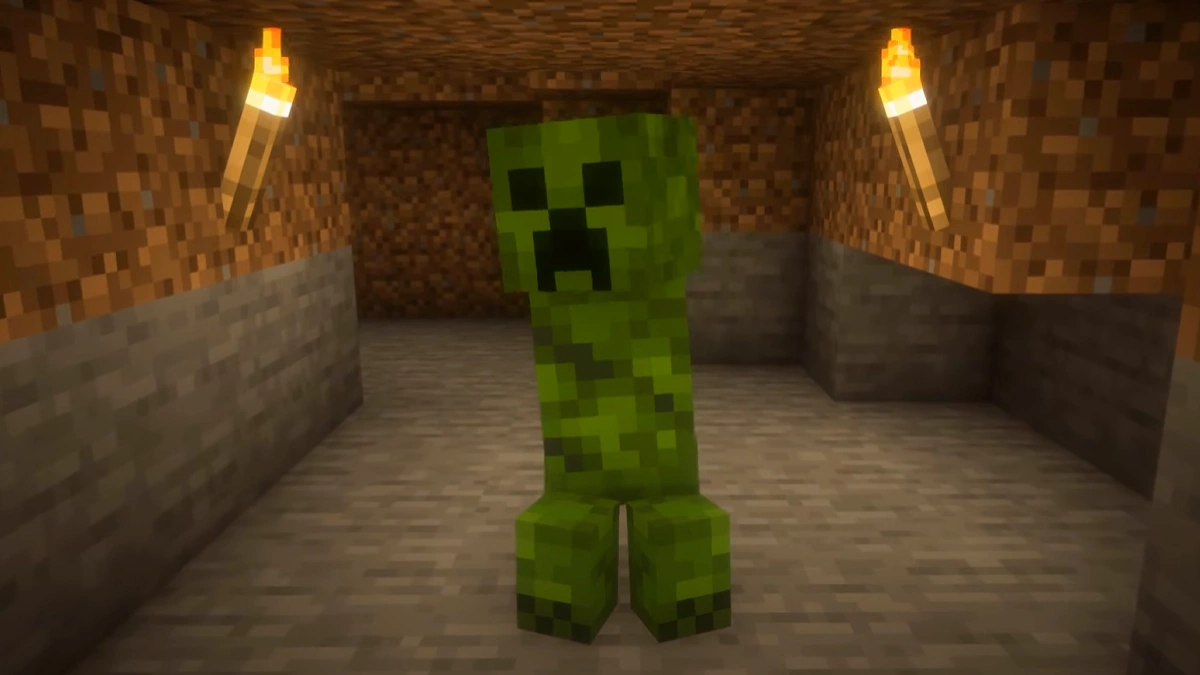
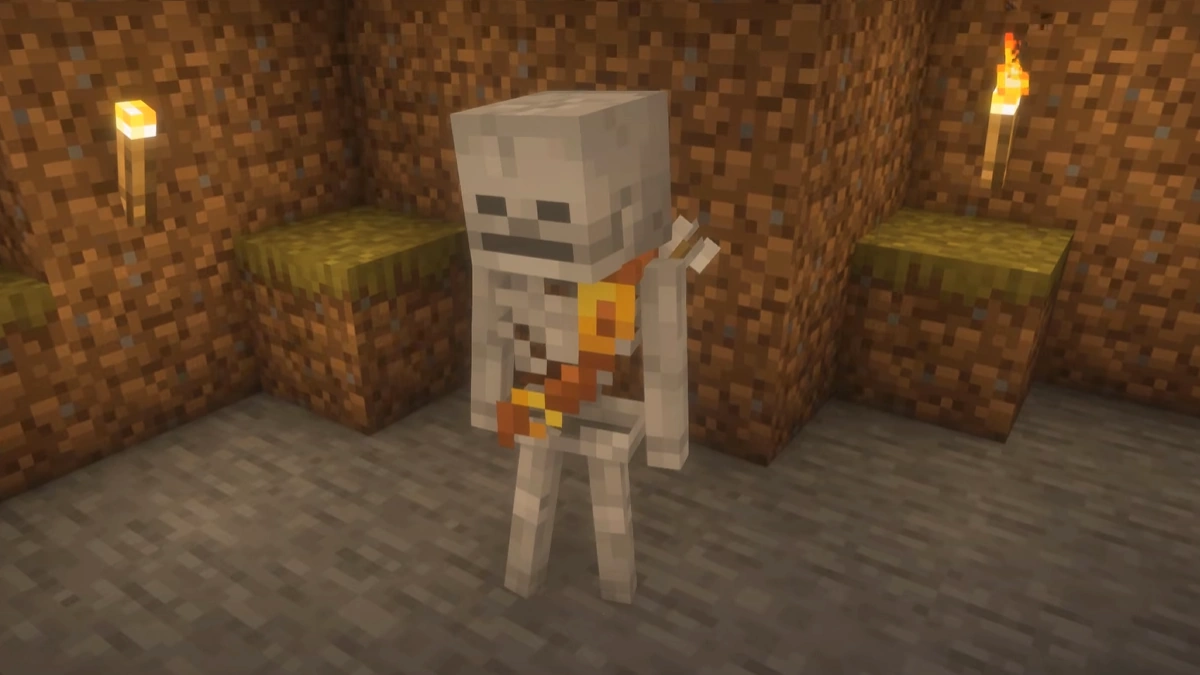
The screenshots show Fresh Animations with the Entity Texture Features, Entity Model Features mods and BSL shaders. The spider now has more legs and a different head, the creeper has four legs, and the skeleton has arrows slung across its back. All three also have new animations, such as facial expressions, and are part of Fresh Animations.
How To Install Entity Textures Features Mod
Here’s a tutorial on installing Entity Textures Features with Fabric in Minecraft Java Edition.
- Download and install Java, as it is required by all Minecraft mods.
- Scroll down to the file section and download the Entity Textures Features mod that matches your Minecraft edition.
- Install Fabric. Make sure to select a version of Fabric that is compatible with your Minecraft and mod version.
- Open the Fabric installer and ensure the Minecraft version matches the one you want. Click “Install” to set up Fabric.
- Open the Minecraft launcher, click on the “Installations” tab, and check that Fabric appears in the list. If it doesn’t, restart the launcher.
- Click on the folder icon next to the Fabric installation. This will open your Minecraft directory. Look for a folder named “mods”. If you don’t see one, create a new folder and name it “mods”.
- Copy the downloaded Entity Textures Features mod .jar file and paste it into the “mods” folder.
- Return to the Minecraft launcher, select your Fabric profile, and click “Play”. The mod should now be installed and ready to use!
We used Fabric for this guide because we think it’s the best mod loader, but you can also install the Entity Textures Features mod using NeoForge, Quilt, or Forge.
Compatible Mods
- Entity Model Features (EMF) – for custom entity models
- dorianpb’s CEM mod – legacy alternative to EMF
- Sodium – performance optimization
- Iris Shaders – shader support (compatibility varies by shader)
- Other mods with modded entities, as long as the mod uses vanilla rendering code
Entity Textures Features Mod Download
[26.2.x] [Fabric/Quilt] Download Entity Texture Features Mod
[26.1.x] [Fabric/Quilt] Download Entity Texture Features Mod
[1.21.11] [Fabric/Quilt] Download Entity Texture Features Mod
[1.21.10 – 1.21.9] [Fabric/Quilt] Download Entity Texture Features Mod
[1.21.8 – 1.21.6] [Fabric/Quilt] Download Entity Texture Features Mod
[1.21.5] [Fabric/Quilt] Download Entity Texture Features Mod
[1.21.4] [Fabric/Quilt] Download Entity Texture Features Mod
[1.21.3 – 1.21.2] [Fabric/Quilt] Download Entity Texture Features Mod
[1.21.1 – 1.21] [Fabric/Quilt] Download Entity Texture Features Mod
[1.20.1 – 1.20] [Fabric/Quilt] Download Entity Texture Features Mod
[1.19.4] [Fabric/Quilt] Download Entity Texture Features Mod
[1.18.2] [Fabric/Quilt] Download Entity Texture Features Mod
[1.17.1] [Fabric/Quilt] Download Entity Texture Features Mod
[1.16.5] [Fabric/Quilt] Download Entity Texture Features Mod
NeoForge (Java Edition):
[26.2.x] [NeoForge] Download Entity Texture Features Mod
[26.1.x] [NeoForge] Download Entity Texture Features Mod
[1.21.11] [NeoForge] Download Entity Texture Features Mod
[1.21.10 – 1.21.9] [NeoForge] Download Entity Texture Features Mod
[1.21.8 – 1.21.6] [NeoForge] Download Entity Texture Features Mod
[1.21.5] [NeoForge] Download Entity Texture Features Mod
[1.21.4] [NeoForge] Download Entity Texture Features Mod
[1.21.3 – 1.21.2] [NeoForge] Download Entity Texture Features Mod
[1.21.1 – 1.21] [NeoForge] Download Entity Texture Features Mod
[1.20.1 – 1.20] [NeoForge] Download Entity Texture Features Mod
[1.19.4] [NeoForge] Download Entity Texture Features Mod
[1.18.2] [NeoForge] Download Entity Texture Features Mod
Forge (Java Edition):
[1.21.11] [Forge] Download Entity Texture Features Mod
[1.21.10 – 1.21.9] [Forge] Download Entity Texture Features Mod
[1.21.8 – 1.21.6] [Forge] Download Entity Texture Features Mod
[1.21.5] [Forge] Download Entity Texture Features Mod
[1.21.4] [Forge] Download Entity Texture Features Mod
[1.21.3 – 1.21.2] [Forge] Download Entity Texture Features Mod
[1.21.1 – 1.21] [Forge] Download Entity Texture Features Mod
[1.20.1 – 1.20] [Forge] Download Entity Texture Features Mod
[1.19.4] [Forge] Download Entity Texture Features Mod
[1.18.2] [Forge] Download Entity Texture Features Mod
[1.17.1] [Forge] Download Entity Texture Features Mod
[1.16.5] [Forge] Download Entity Texture Features Mod
