There are two kinds of people when playing Minecraft: those who prefer realism and those who prefer a fantasy universe. If you want to add realistic physics to your Minecraft world, there is nothing worth trying other than the Physics Mod. This mod completely changes some major areas of the game, such as forces & motions, collisions, body dynamics, and other physics simulations.
Detailed Features of Physics Mod
- Forces and motions: You can expect gravity to behave like on Earth or any planet you can think of. The settings are adjustable, allowing you to experience the force of gravity in your Minecraft world.
- Body Dynamics: Some objects can bend, wobble, or deform with the Physics Mod. You can see this clearly on some objects.
- Collisions: When you are fighting against a mob or if you are hitting the wall, there will be a collision effect like bouncing and there is also friction involved where you’ll slow down a little before a complete stop.
Cloth Physics
Clothing that your character wears, especially capes can now behave more realistically with gravity and aerodynamic drag. That means, it will have flapping and rippling motion like it were affected by the wind.
No longer will you see a rigid cape on the back of your character like a flat board hanging on the shoulder. The cloth physics is also super detailed, especially when you see the fabric is moved alongside your character’s movement. It creates a fluid and dynamic movement without exaggeration, making it realistic and enjoyable to see. This feature is also compatible with the popular OptiFine capes. To use it, you need to install the Physics Mod with Forge.
The cloth physics is also not solely applied to clothing since you can also see it in action with banners. You can see it naturally flowing with the wind or you can walk towards it and it will react accordingly. On top of that, this feature also makes leashes and fishing lines more realistic.

Liquid Physics
Remember when the water around you was just a simple block? Physics Mod Pro actually changes the way it behaves. In the earlier version, it looks like a blob of water that resembles thick syrup. It is rather slimy, and you can hit them and bounce around really cute. In a newer update, it retains its characteristic of big blob drops, but it has better interaction with its surroundings including character movement. The water flow is also significantly faster just like a real-world water drop.
Enjoy splashing around with the water and customize various settings to achieve the desired effects. You can select how big the blobs and how many particles will be. You can also set how long the water droplets are going to last. All of those settings can be accessed easily, and it is important to know that they may affect your gaming performance because this mod requires a great computing resource. If you have a really good graphics card, you can also install realistic shaders. You won’t be able to make Minecraft any more realistic than that. However, keep in mind that you will need an extremely powerful graphics card if you also install shaders. If you want to push your hardware to its absolute limits, then you should also get a 512×512 texture pack.

Smoke Physics
The vanilla Minecraft doesn’t put a great emphasis on smoke effects. Typically, the smoke blobs just rise and disappear into thin air after a specific height. However, the smoke effect with the Physics Mod is vastly different from how it accumulates before it dissipates.
Talking about accumulating smoke, it is true that you can see a greater effect if you have a source of fire indoors since the smoke will accumulate on the ceiling, getting thicker and darker before it finds a way out. The participle is also much smoother and more realistic-looking. However, you can also see an interesting effect if you put the fire on the tree. You can see the black smoke is slowly creeping and surrounding the tree before it goes up. Considering it accumulates on the ceiling, you should be prepared when dealing with smoke indoors with low-height ceilings because your visibility will be greatly reduced, blinding you from walking around comfortably. If you’re on fire, the Low Fire Texture Pack might be helpful for you, as it reduces the animation.
The smoke physics is not only great for regular campfires or fire blocks because it also works super well with explosives. The smoke resulting from the TNT, for instance, will react with the surrounding environment including block-breaking physics.

Ocean Physics
This is a dedicated behavior that is quite different from regular liquid physics. It animates the ocean in the game and it looks super cool especially if you play it with Minecraft shaders, which is highly recommended. Each shader gives a distinctive look, making this mod even more unique.
If you think the waves will have the same size throughout the world, you’ll be happy to know it does not. The big waves only happen in the ocean while other bodies of water still have small ripples. Additionally, the waves also get bigger the further it is from the mainland which is also a cool feature.
One thing you may notice is when you’re in the water. Your body will move according to the wave because of its surface movement. Just like other features, ocean physics can be customized. You can adjust wave distance to shore, surface detail, height, speed, and horizontal scaling. You can also have a weather multiplier which gives extra wave strength during a storm, for example. So you can decide for yourself whether you want to enjoy a relaxing beach vacation or simulate the end of the world. If you choose the latter, then install Tissou’s Zombie Pack and Hysteria Shaders right away.

Snow Physics
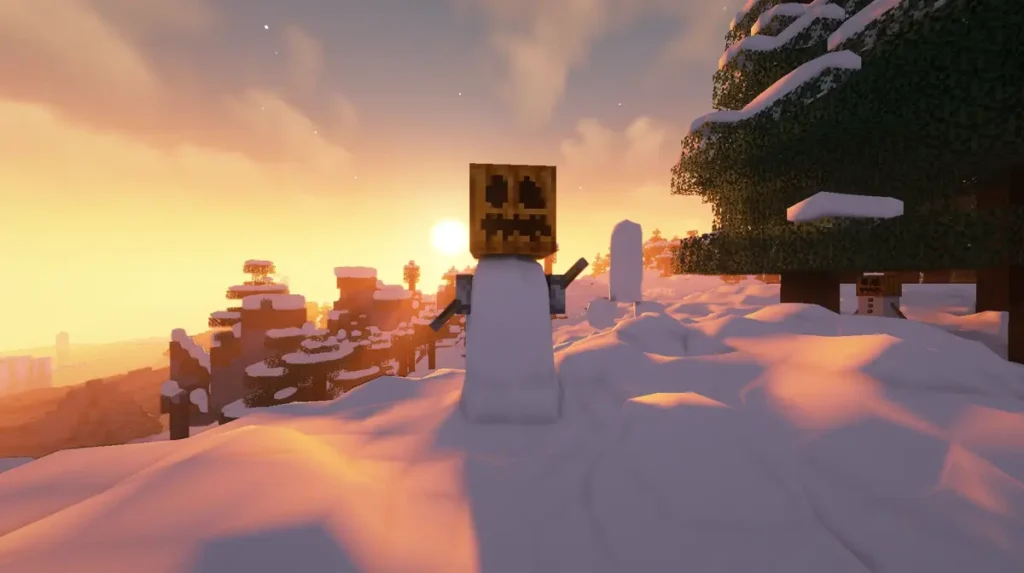
Another visual-changer is how snow appears in the world with this blocky physics mod. It is completely different from vanilla because it looks thicker, fluffier, and more believable. You will see the snow piling up on each block giving a very realistic visual. Your snow biomes will look so much better with this physics engine.
In addition to just the visual treats, you can also experience a snow trail wherever you go. This also applies to other organisms, such as animals and mobs. Exploring the snow cannot be more exciting with this feature. If you happen to have your own snow and want to build a structure, the snow quickly adapts to where it is put. You really can make a lot of cool stuff with the snow. This can be seen in the world transitions from the snowy area to the dry areas if you use the Physics Mod Pro.
Dynamic Block Physics
The Dynamic block feature allows blocks to dynamically move depending on actions towards it. For example, a grass will move alongside your character as you make contact with it. The force applied equals to the speed you are going at, making it realistic and believable.
The dynamic physics applies to several blocks, and one of them is windows and doors. Instead of just simple opening and closing instantly to their full motion, they now have a realistic swing and wobble. This makes the doors and windows slowly settle before resting just as they would in real life.
If you like enjoying the world underneath the surface i.e. the depth of the ocean, you definitely like the dynamic block physics here. You will no longer pass through the seaweed like a ghost. Instead, the weeds will be pushed around as you swim into them. Their deformation is also realistic as it only bends at the point you make contact.
With the available settings, you can customize how the dynamic block behaves. You can set how easily they sway with the wind. You can also tell which block becomes a dynamic block as it is usually great with vines and not other blocks. You can make a fantasy world with a great physics setting with the mod.
Physics Mod Pro vs Lite (Free)
If you are interested in downloading this gravity mod, the developer offers two main versions: the Lite Version (free) and the Pro Version (paid). Here are some of the differences.
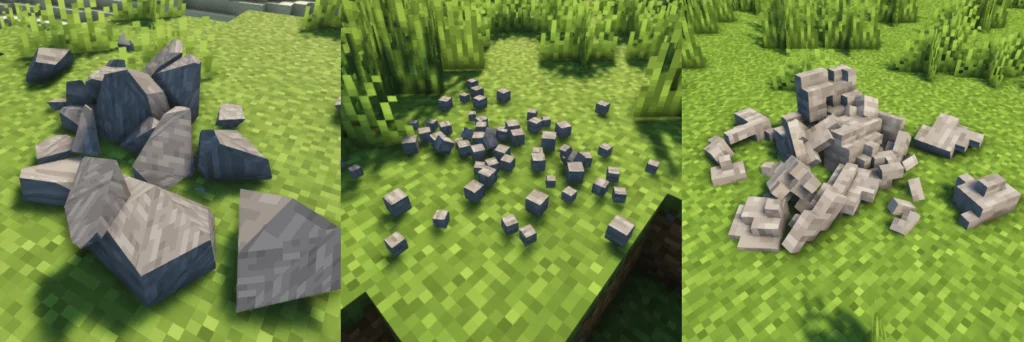
The lite version is actually an older pro version that hasn’t been updated with all the new features, so you could call it the Physics mod pro free edition. It still has some of the best features you expect from the Physics Mod for Minecraft such as gravity settings for items, characters, and pretty much anything. You can also set how mobs react when hit, such as being collapsed. Lastly, there is a block fracture that scatters and drops to the ground when destroyed. Even without spending money, you can enjoy the free Physics Mod in your own Minecraft world.
The core functionality of the Physics Mod is already available in the Lite version. The pro version offers far greater features that you’ll like.
Exclusive Pro Features:
- Extra Features: clothing, ocean, weather, smoke, snow, liquid, vine, door, cape, and banner physics are some additional features that you won’t get in the free lite version. These implementations of physics in multiple areas give a more realistic Minecraft gameplay.
- Updated Features: The mod development never stops. You can miss important bug fixes or new features if you don’t pay for the pro version of the mod.
- Request Priority: if you want to request a new feature, being a member of the mod creator’s Patreon will give you the opportunity to be heard louder. That means your request is valued more highly than other users.
The Physics Mod Pro is highly recommended if you want to enjoy Physics Mod at its fullest. However, it is worth noting that some settings will reduce your gaming performance, especially coupled with heavy use of shaders. Therefore, you definitely need to try adjusting the settings to fit your gameplay the best.
Video
How To Install Physics Mod
Here’s a tutorial on installing Physics with Fabric in Minecraft Java Edition.
- Download and install Java, as it is required by all Minecraft mods.
- Scroll down to the file section and download the Physics mod that matches your Minecraft edition.
- Install Fabric. Make sure to select a version of Fabric that is compatible with your Minecraft and mod version.
- Open the Fabric installer and ensure the Minecraft version matches the one you want. Click “Install” to set up Fabric.
- Open the Minecraft launcher, click on the “Installations” tab, and check that Fabric appears in the list. If it doesn’t, restart the launcher.
- Click on the folder icon next to the Fabric installation. This will open your Minecraft directory. Look for a folder named “mods”. If you don’t see one, create a new folder and name it “mods”.
- Copy the downloaded Physics mod .jar file and paste it into the “mods” folder.
- Return to the Minecraft launcher, select your Fabric profile, and click “Play”. The mod should now be installed and ready to use!
Physics Mod Download
This is a completely different version made for Bedrock Edition, which only changes the item physics and includes other features compared to the reviewed Physics Mod for Java.
Pro Version for Fabric, Quilt, Forge and NeoForge (Java Edition):
Download Physics Mod Pro
Lite Version for Fabric and Quilt (Java Edition):
[26.2.x] [Fabric/Quilt] Download Physics Mod Lite
[26.1.x] [Fabric/Quilt] Download Physics Mod Lite
[1.21.11] [Fabric/Quilt] Download Physics Mod Lite
[1.21.10 – 1.21.9] [Fabric/Quilt] Download Physics Mod Lite
[1.21.8 – 1.21.6] [Fabric/Quilt] Download Physics Mod Lite
[1.21.1 – 1.21] [Fabric/Quilt] Download Physics Mod Lite
[1.20.6 – 1.20.5] [Fabric/Quilt] Download Physics Mod Lite
[1.20.1 – 1.20] [Fabric/Quilt] Download Physics Mod Lite
[1.19.4] [Fabric/Quilt] Download Physics Mod Lite
[1.19.2 – 1.19] [Fabric/Quilt] Download Physics Mod Lite
[1.18.2] [Fabric/Quilt] Download Physics Mod Lite
[1.17.1 – 1.17] [Fabric/Quilt] Download Physics Mod Lite
[1.16.5] [Fabric/Quilt] Download Physics Mod Lite
Lite Version for NeoForge (Java Edition):
[26.2.x] [NeoForge] Download Physics Mod Lite
[26.1.x] [NeoForge] Download Physics Mod Lite
[1.21.11] [NeoForge] Download Physics Mod Lite
[1.21.10 – 1.21.9] [NeoForge] Download Physics Mod Lite
[1.21.8 – 1.21.6] [NeoForge] Download Physics Mod Lite
[1.21.5] [NeoForge] Download Physics Mod Lite
[1.21.4] [NeoForge] Download Physics Mod Lite
[1.21.3 – 1.21.2] [NeoForge] Download Physics Mod Lite
[1.21.1 – 1.21] [NeoForge] Download Physics Mod Lite
[1.20.6] [NeoForge] Download Physics Mod Lite
[1.20.2] [NeoForge] Download Physics Mod Lite
[1.20.1 – 1.20] [NeoForge] Download Physics Mod Lite
Lite Version for Forge (Java Edition):
[26.2.x] [Forge] Download Physics Mod Lite
[26.1.x] [Forge] Download Physics Mod Lite
[1.21.11] [Forge] Download Physics Mod Lite
[1.21.10 – 1.21.9] [Forge] Download Physics Mod Lite
[1.21.8 – 1.21.6] [Forge] Download Physics Mod Lite
[1.21.5] [Forge] Download Physics Mod Lite
[1.21.4] [Forge] Download Physics Mod Lite
[1.21.3] [Forge] Download Physics Mod Lite
[1.21.1 – 1.21] [Forge] Download Physics Mod Lite
[1.20.6 – 1.20.5] [Forge] Download Physics Mod Lite
[1.20.4 – 1.20.3] [Forge] Download Physics Mod Lite
[1.20.2] [Forge] Download Physics Mod Lite
[1.20.1 – 1.20] [Forge] Download Physics Mod Lite
[1.19.4] [Forge] Download Physics Mod Lite
[1.19.3] [Forge] Download Physics Mod Lite
[1.19.2 – 1.19] [Forge] Download Physics Mod Lite
[1.18.2] [Forge] Download Physics Mod Lite
[1.17.1] [Forge] Download Physics Mod Lite
[1.16.5] [Forge] Download Physics Mod Lite

The fact that Minecraft is so realistic