Ever noticed how your Minecraft character walks like a robot? The default animations have been the same stiff movements for years now. The Fresh Moves Texture Pack completely changes that. Over 10 million players have downloaded this pack across different platforms, and after five minutes you’ll understand why. It fits perfectly with Minecraft’s vanilla look, doesn’t overdo anything, just makes everything feel a bit more alive.
Unlike regular texture packs, Fresh Moves only changes player animations. The textures themselves stay the same, but you can still use other packs alongside it. You move more realistically when walking and swimming. Even when you’re just standing around, it looks way cooler. The walking animations actually look like real walking now. Arms and legs move in sync, shoulders sway slightly. When you’re sprinting, the difference is even more noticeable. Swimming doesn’t look like rigid paddling anymore. Even when sneaking, your feet don’t sink into the ground unrealistically anymore.
When you’re idle, your character doesn’t just stand there like a statue, because now you can see a subtle breathing motion. While sleeping, the pose adjusts and the breathing slows down. These small details make a surprising difference and are noticeably better than traditional resource packs that only change how blocks look. Ready to bring your Minecraft skin to life? Download Fresh Moves now!
Fresh Moves was released on March 23, 2024 and is compatible with these Minecraft versions: 1.21.11 - 1.21.10 - 1.21.9 - 1.21.8 - 1.21.7 - 1.21.6 - 1.21.5 - 1.21.4 - 1.21.3 - 1.21.2 - 1.21.1 - 1.21 - 1.20.6 - 1.20.5 - 1.20.4 - 1.20.3 - 1.20.2 - 1.20.1 - 1.20 - 1.19.4 - 1.19.3 - 1.19.2 - 1.19.1 - 1.19 - 1.18.2
Video & Screenshots
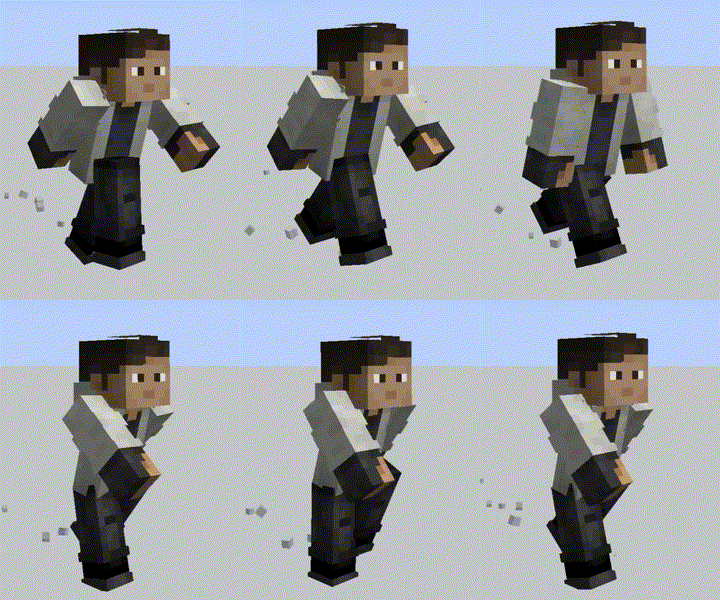
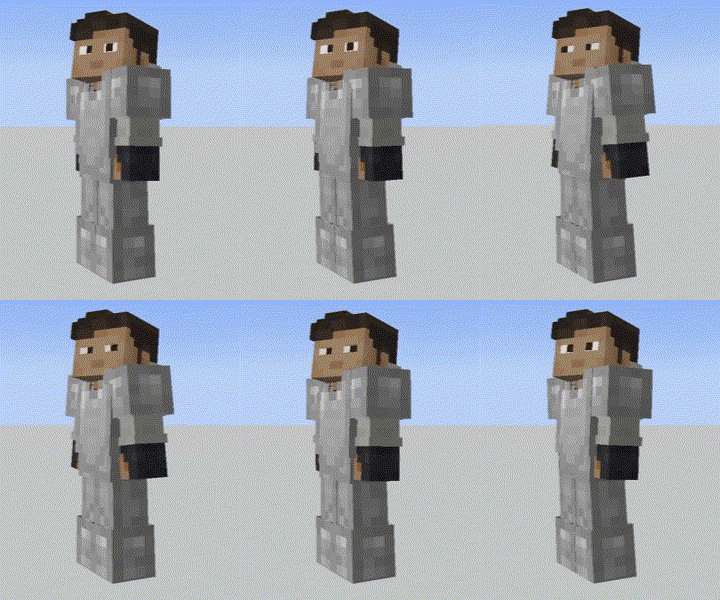

How To Install Fresh Moves Texture Pack
Here’s a tutorial for PC users on installing Fresh Moves in Minecraft Java Edition.
- Download the Fresh Moves texture pack for Minecraft from the file section below. Pick the file that matches your Minecraft edition and version.
- Download and install Entity Model Features (EMF) and Entity Texture Features (ETF). Both mods work with Fabric, NeoForge, Forge and Quilt.
- Open the Minecraft launcher and select the newly created Fabric, NeoForge, Forge or Quilt installation.
- Launch Minecraft using the new installation.
- Click "Options" on the main menu.
- In the options, go to the submenu “Resource Packs”.
- Click "Open Pack Folder" at the bottom left to see a folder titled "resourcepacks".
- Put the downloaded ZIP file into your "resourcepacks" folder. Or, just drag and drop it into the Minecraft window to add the pack.
- You will see the pack on the left side of the resource pack selection menu. Unzip the file if you can't see the pack.
- Hover over the pack thumbnail and click the arrow pointing right.
If the game notifies you that the pack is made for a newer or older Minecraft version, simply click “Yes” to proceed. Most textures will still work.
- Click "Done" and all assets have been loaded.
Important: OptiFine won’t work. OptiFine can’t display custom player models, so you need EMF and ETF instead.
Performance and Compatibility
What’s really great is that Fresh Moves runs well even on older computers. The pack only changes animations, not high-resolution textures. EMF and ETF are more performant than OptiFine, especially with Sodium and Iris. For shaders, you’re better off using Iris instead of OptiFine anyway. The performance is better and Fresh Moves runs smoothly alongside them. For years OptiFine was the standard, but nowadays Sodium, Iris, EMF, and ETF are the better choice. More FPS, more features, better compatibility.
Fresh Moves is also compatible with some optional mods. For example, Parcool works perfectly, though you should turn off “Fast Running” and “Fast Swimming.” Emotecraft runs almost perfectly as long as you’re not moving at the same time. The Essential Mod and its emotes are fully supported. Better Combat, Amendments, and Paraglider don’t cause any issues either. The big advantage over similar texture packs is that Fresh Moves doesn’t override arm animations. If a mod has special arm movements, they’re preserved.
Common Issues
Black eyes are almost always because “Allow skin transparency” isn’t enabled. Double-check your ETF settings. Alternatively, download the version without animated eyes.
If nothing works at all: Are EMF and ETF installed for the right Minecraft version? Is “Custom Player Models” enabled in EMF? Test the pack without other mods. Sometimes there are conflicts with other animation packs.
Fresh Moves Texture Pack Download
This version works with any skin without modifications. You get all movement animations (walking, swimming, idle, cape), just the eyes and eyebrows aren’t animated.
[16x] [1.21.2 – 1.18.2] Download Fresh Moves No Animated Eyes Texture Pack
With Animated Eyes (Java Edition):
This version includes animated eyes and eyebrows. You’ll need to modify your skin and add extra pixels. Check out the Fresh Moves Wiki for detailed instructions. In multiplayer, you’ll also see animated faces from other players using the same setup.
[16x] [1.21.2 – 1.18.2] Download Fresh Moves Animated Eyes Texture Pack

great, but please can someone from the community update this to the latest Bedrock version
I used Fresh Animations for years, but this one is better for me, because it’s easier to use with other packs