Entity Model Features, or EMF for short, is a Minecraft mod that some texture packs require to work properly. With it, texture packs can do a lot more than just change the colors and textures of mobs. They can completely overhaul their 3D shape and animations. So if you’re using a texture pack that makes mobs like skeletons, villagers, or creepers look or move differently, EMF is what makes that actually happen in-game. Without it, none of those changes would show up, no matter which texture pack you have installed.
Something we noticed while testing packs for the site: pretty much every texture pack that’s still being actively developed has switched from OptiFine to EMF at this point. The reason isn’t complicated once you’ve been following the Minecraft modding scene for a while. OptiFine used to be the only way to get these kinds of mob model changes working at all, but it’s simply not being maintained the way it used to be. Over the past few years, every time Mojang released a new Minecraft version, players were sometimes waiting months for a working OptiFine build to drop. During that time, any texture pack relying on these features just didn’t work right. EMF gets updated much faster, so texture packs are usually good to go right when a new Minecraft version launches.
On top of that, OptiFine only works with the Forge mod loader. The problem is that Forge isn’t really the standard anymore. Fabric and NeoForge have largely taken over, and a lot of popular mods these days either don’t release for Forge at all or show up there much later. If you’re on OptiFine and want to run other mods alongside your texture pack, you’re going to run into compatibility walls fast. EMF runs on all the major mod loaders, including Fabric, NeoForge, Forge, and Quilt, and it’s fully compatible with performance mods like Sodium and Iris Shaders, which flat-out don’t work with OptiFine.
Here’s what EMF actually supports: The core feature is custom 3D models for every mob in the game. That means a texture pack can give a mob longer legs, a different body shape, or entirely new body parts that don’t exist in vanilla. Their animations can be changed too, so things like how they walk, how they look around, and how they react to the player. Packs like Fresh Animations use exactly this to make mobs feel way more alive than they do in the base game.
Your own player model can be fully customized with EMF as well. A texture pack isn’t limited to just changing your skin. It can change your character’s actual shape and how it moves. That applies to the standard player model, the slim model, and even the cape. If you have a cape and a texture pack that supports it, EMF lets creators completely redefine how it behaves. Good examples here are Fresh Moves and the Player Extensions add-on for Fresh Animations, both of which add brand new animations directly to player skins.
One thing EMF offers that OptiFine doesn’t: armor can have its own custom 3D models, and those models can be different depending on which mob is wearing the armor. So a texture pack could give a zombie in full armor a completely different armor shape than a skeleton wearing the exact same set. OptiFine can’t do that because it forces every mob to use the same default armor model. This also extends to regular player armor. That’s why texture packs like Armory Conglomery only work with the Entity Model Features mod. The pack takes full advantage of this feature to create detailed 3D armor designs that have gone pretty viral on YouTube and TikTok.
For texture pack creators, EMF also gives a lot more control over animations than OptiFine ever did. There are extra variables that let creators detect things like whether a mob is climbing, holding a shield, submerged in water, or how far away it is from the player. Using that information, animations can be tuned to react to what’s actually happening in the game, which is why packs built for EMF tend to have noticeably smoother and more natural-looking movement.
One difference from OptiFine worth knowing about: EMF doesn’t support sprites inside mob models. Sprites are flat 2D images that can be placed inside a 3D model, usually used for small details or effects. It’s a pretty niche feature and the vast majority of texture packs don’t use it, so for most players it won’t matter at all. But if you happen to use a specific pack that depends on it, that’s something to keep in mind.
To install EMF, you’ll also need Entity Texture Features (ETF), which is made by the same developer. ETF handles texture variations for mobs, like which skin a mob gets, while EMF handles the models and animations. The two mods are built to work together, and EMF isn’t fully functional without ETF installed alongside it.
Entity Model Features was first published on April 2, 2023 and is compatible with these Minecraft versions: 26.2 - 26.1.2 - 26.1.1 - 26.1 - 1.21.11 - 1.21.10 - 1.21.9 - 1.21.8 - 1.21.7 - 1.21.6 - 1.21.5 - 1.21.4 - 1.21.3 - 1.21.2 - 1.21.1 - 1.21 - 1.20.6 - 1.20.5 - 1.20.4 - 1.20.3 - 1.20.2 - 1.20.1 - 1.20 - 1.19.4 - 1.19.3 - 1.19.2 - 1.19.1 - 1.19 - 1.18.2 - 1.18.1 - 1.18 - 1.17.1 - 1.17 - 1.16.5
Screenshots
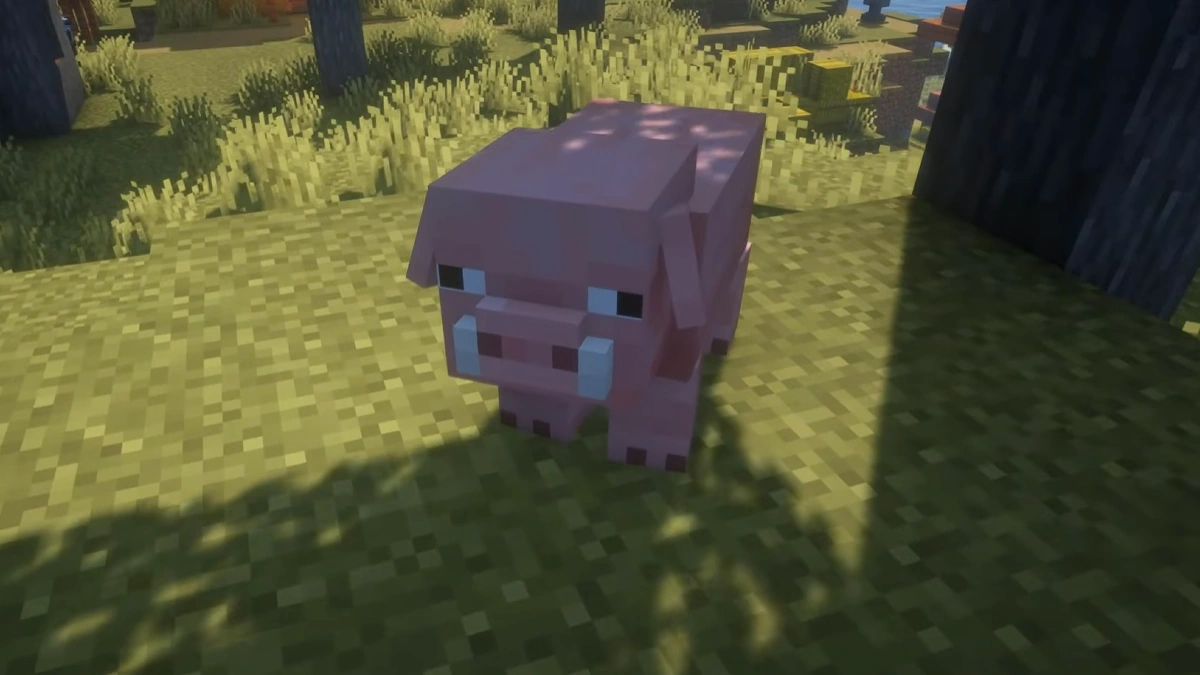
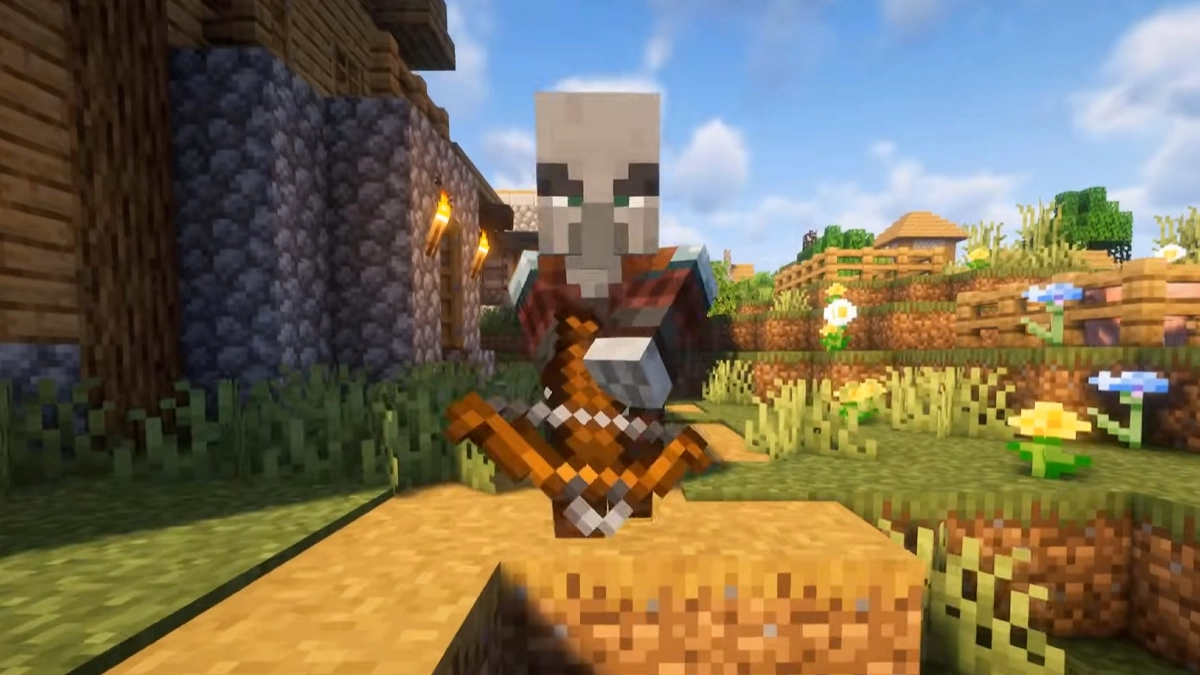
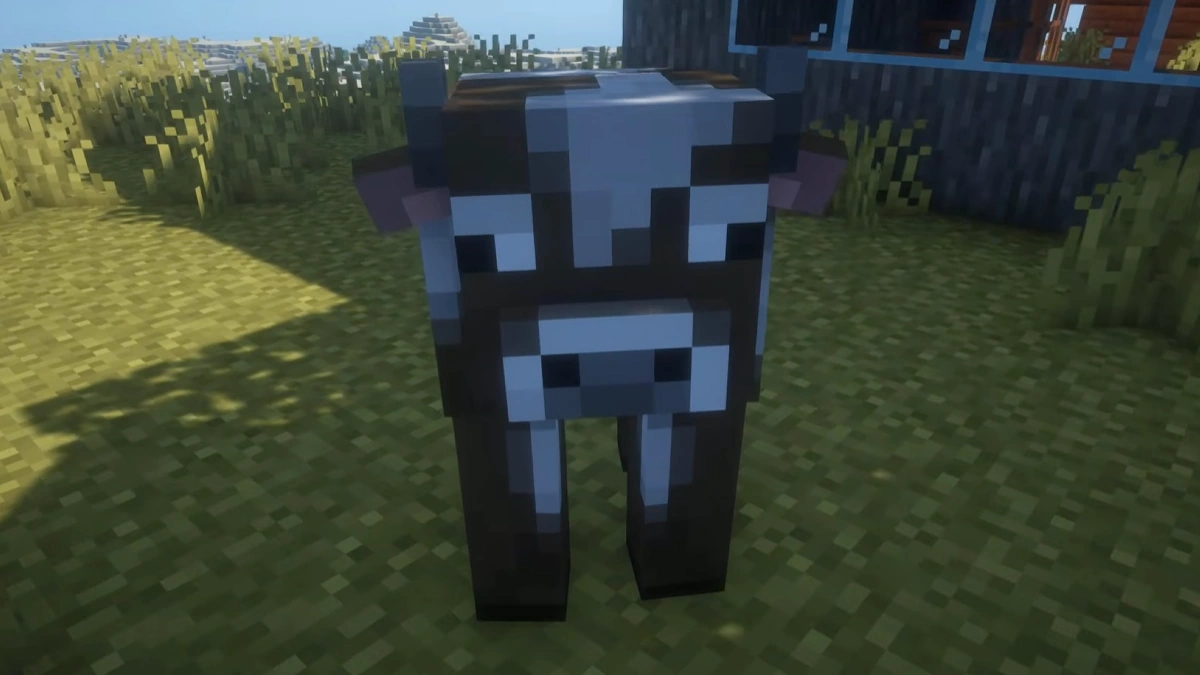
The screenshots show Fresh Animations with the Entity Model Features, Entity Texture Features mods and BSL shaders. The pig now has floppy ears, the pillager has a different posture and facial expressions, and the cow has different ears. All three also have new animations and are part of Fresh Animations.
How To Install Entity Model Features Mod
Here’s a tutorial on installing Entity Model Features with Fabric in Minecraft Java Edition.
- Download and install Java, as it is required by all Minecraft mods.
- Scroll down to the file section and download the Entity Model Features mod that matches your Minecraft edition.
- Install Fabric. Make sure to select a version of Fabric that is compatible with your Minecraft and mod version.
- Open the Fabric installer and ensure the Minecraft version matches the one you want. Click “Install” to set up Fabric.
- Open the Minecraft launcher, click on the “Installations” tab, and check that Fabric appears in the list. If it doesn’t, restart the launcher.
- Click on the folder icon next to the Fabric installation. This will open your Minecraft directory. Look for a folder named “mods”. If you don’t see one, create a new folder and name it “mods”.
- Copy the downloaded Entity Model Features mod .jar file and paste it into the “mods” folder.
- Return to the Minecraft launcher, select your Fabric profile, and click “Play”. The mod should now be installed and ready to use!
Important: To ensure everything runs smoothly, we recommend installing Entity Texture Features (ETF) as well. You can also optionally install Entity Culling, as it improves performance when used with EMF.
We used Fabric for this guide because we consider it the best mod loader. However, the Entity Texture Features mod can also be installed using NeoForge, Quilt, or Forge.
Entity Model Features Mod Download
[26.2.x] [Fabric/Quilt] Download Entity Model Features Mod
[26.1.x] [Fabric/Quilt] Download Entity Model Features Mod
[1.21.11] [Fabric/Quilt] Download Entity Model Features Mod
[1.21.10 – 1.21.9] [Fabric/Quilt] Download Entity Model Features Mod
[1.21.8 – 1.21.6] [Fabric/Quilt] Download Entity Model Features Mod
[1.21.5] [Fabric/Quilt] Download Entity Model Features Mod
[1.21.4] [Fabric/Quilt] Download Entity Model Features Mod
[1.21.3 – 1.21.2] [Fabric/Quilt] Download Entity Model Features Mod
[1.21.1 – 1.21] [Fabric/Quilt] Download Entity Model Features Mod
[1.20.1 – 1.20] [Fabric/Quilt] Download Entity Model Features Mod
[1.19.4] [Fabric/Quilt] Download Entity Model Features Mod
[1.19.2] [Fabric/Quilt] Download Entity Model Features Mod
[1.18.2] [Fabric/Quilt] Download Entity Model Features Mod
NeoForge (Java Edition):
[26.2.x] [NeoForge] Download Entity Model Features Mod
[26.1.x] [NeoForge] Download Entity Model Features Mod
[1.21.11] [NeoForge] Download Entity Model Features Mod
[1.21.10 – 1.21.9] [NeoForge] Download Entity Model Features Mod
[1.21.8 – 1.21.6] [NeoForge] Download Entity Model Features Mod
[1.21.5] [NeoForge] Download Entity Model Features Mod
[1.21.4] [NeoForge] Download Entity Model Features Mod
[1.21.3 – 1.21.2] [NeoForge] Download Entity Model Features Mod
[1.21.1 – 1.21] [NeoForge] Download Entity Model Features Mod
[1.20.1 – 1.20] [NeoForge] Download Entity Model Features Mod
[1.19.4] [NeoForge] Download Entity Model Features Mod
[1.19.2] [NeoForge] Download Entity Model Features Mod
[1.18.2] [NeoForge] Download Entity Model Features Mod
Forge (Java Edition):
[1.21.11] [Forge] Download Entity Model Features Mod
[1.21.10 – 1.21.9] [Forge] Download Entity Model Features Mod
[1.21.8 – 1.21.6] [Forge] Download Entity Model Features Mod
[1.21.5] [Forge] Download Entity Model Features Mod
[1.21.4] [Forge] Download Entity Model Features Mod
[1.21.3 – 1.21.2] [Forge] Download Entity Model Features Mod
[1.21.1 – 1.21] [Forge] Download Entity Model Features Mod
[1.20.1 – 1.20] [Forge] Download Entity Model Features Mod
[1.19.4] [Forge] Download Entity Model Features Mod
[1.19.2] [Forge] Download Entity Model Features Mod
[1.18.2] [Forge] Download Entity Model Features Mod
