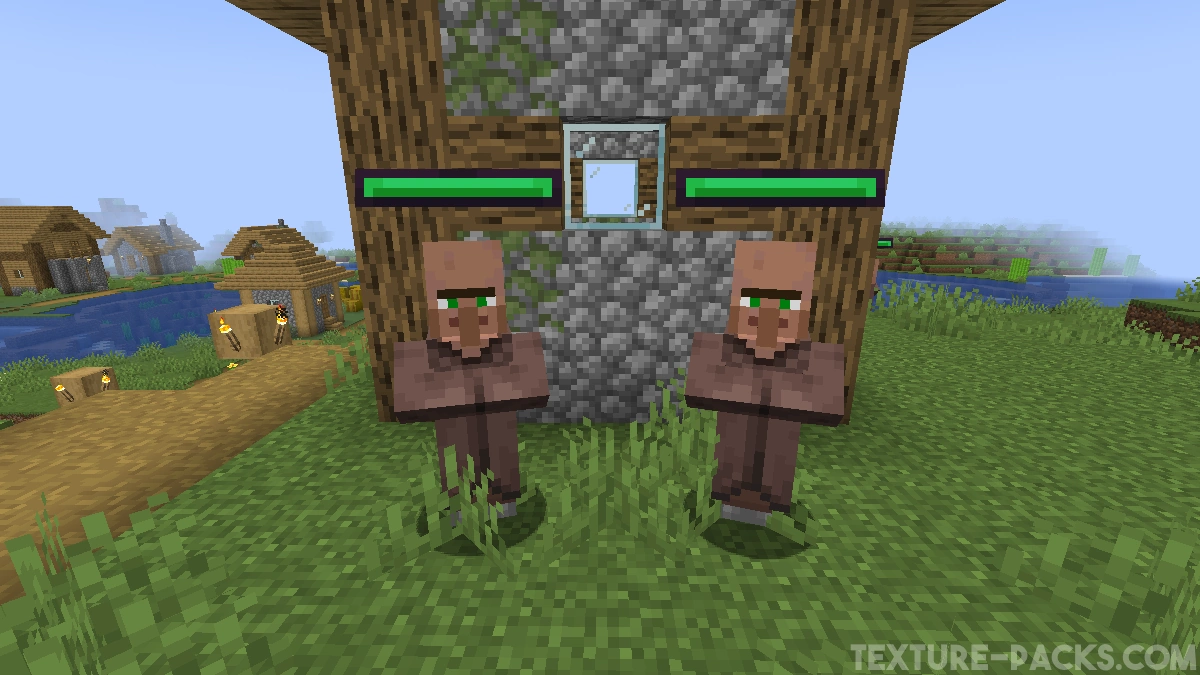
In the past, you had to install extra mods just to see a mob’s health above its head. Now there’s the Entity Healthbars texture pack, which shows you a health bar right away so you can see exactly how much life a creature has left. Every hit updates the bar instantly. That way you always know if a creeper or any other enemy is about to go down or if you need a few more hits.
After installing it, the game world definitely looks different because little bars now appear above the bodies of animals and other creatures walking around. At first, it might feel a little strange since it doesn’t really make the game look prettier. But the usefulness is clear, and this pack is pure gold for keeping track of your opponents’ health. It works in the overworld, nether, and the end. Since it doesn’t change any other textures, it’s very lightweight and runs smoothly on any device with high FPS. You can even play it with Minecraft shaders without any problems.
Ewan Howell, the creator of the pack, also thought about how to make the health display more user-friendly. He added different colors for each type of mob, and here’s a quick guide to what they mean. Passive creatures, like villagers, always have a green health bar because they won’t attack you and are peaceful. Neutral creatures, like iron golems, have a yellow bar because they only become aggressive if you attack or provoke them. Red health bars mean danger, as those hostile mobs, like skeletons, attack immediately. The rarest but most dangerous are purple bars, which only bosses like the ender dragon have. Even with this healthbar resource pack, they’re very tough to beat and you’ll need the best weapons and armor. If farming for that gear is slow, you can use the XRay Ultimate texture pack, which makes all blocks invisible and shows diamonds or ancient debris in the nether right away for netherite.
For some background, the original pack was made for the Java Edition on PC. Due to high demand, it’s now also available for the Bedrock Edition (MCPE). The creators differ depending on the edition, but everything works very similarly. The only limitation is that health bars only appear on vanilla mobs, not on creatures added by mods like Realism Craft from the Marketplace. Adjusting the code for that is complicated, so we recommend using the Entity Healthbars texture pack in regular Minecraft. In our tests, we noticed just how much of an advantage it gives in PvP.
It’s pretty surprising that a feature like this isn’t already built into Minecraft. Many other big games have had it for years. Fortnite, Roblox, League of Legends — all of them show health bars above characters. This add-on is an important way to optimize your gameplay. If you like improving small details, check out the Clear Glass texture pack too.
Entity Healthbars was released on October 31, 2020 and is compatible with these Minecraft versions: 1.21.11 - 1.21.10 - 1.21.9 - 1.21.8 - 1.21.7 - 1.21.6 - 1.21.5 - 1.21.4 - 1.21.3 - 1.21.2 - 1.21.1 - 1.21 - 1.20.6 - 1.20.5 - 1.20.4 - 1.20.3 - 1.20.2 - 1.20.1 - 1.20 - 1.19.4 - 1.19.3 - 1.19.2 - 1.19.1 - 1.19 - 1.18.2 - 1.18.1 - 1.18 - 1.17.1 - 1.17 - 1.16.5 - 1.16.4 - 1.16.3 - 1.16
Video & Screenshots


Comparison
Use our comparison tool to compare the Minecraft default pack with Entity Healthbars.


How To Install Entity Healthbars Texture Pack
Here’s a tutorial on installing Entity Healthbars in Minecraft Java Edition. If you’re using Minecraft Bedrock Edition and the pack is available for Bedrock/MCPE, you can simply click on the downloaded file to install it.
- Download and install OptiFine, as it is required by most texture packs.
- Download the Entity Healthbars texture pack for Minecraft from the file section below. Pick the file that matches your Minecraft edition and version.
- Launch Minecraft.
- Click "Options" on the main menu.
- In the options, go to the submenu “Resource Packs”.
- Click "Open Pack Folder" at the bottom left to see a folder titled "resourcepacks".
- Put the downloaded ZIP file into your "resourcepacks" folder. Or, just drag and drop it into the Minecraft window to add the pack.
- You will see the pack on the left side of the resource pack selection menu. Unzip the file if you can't see the pack.
- Hover over the pack thumbnail and click the arrow pointing right. If the game notifies you that the pack is made for a newer or older Minecraft version, simply click “Yes” to proceed. Most textures will still work.
- Click "Done" and all assets have been loaded.
👉 For OptiFine users: Go to Options → Video Settings → Quality and make sure Custom Entity Models, Emissive Textures, and Random Entities are all enabled.
Entity Healthbars Texture Pack Download
[MCADDON] Download Entity Healthbars Texture Pack
Java Edition:
[16x] [1.21.X] Download Spryzeen’s Healthbars Texture Pack
[16x] [1.20.X] Download Spryzeen’s Healthbars Texture Pack
[16x] [1.19.X] Download Entity Healthbars Texture Pack
[16x] [1.18.X] Download Entity Healthbars Texture Pack
[16x] [1.16.X] Download Entity Healthbars Texture Pack
Entity Healthbars: Hearts Add-on (Java Edition):
This add-on shows small hearts above mobs instead of bars and requires the base pack to work.
[16x] [1.18.X – 1.17.X] Download Entity Healthbars: Hearts Add-on
[16x] [1.16.X] Download Entity Healthbars: Hearts Add-on
Entity Healthbars: 64x Add-on (Java Edition):
This add-on provides higher resolution 64x textures and was made for Faithful 64×64. It also requires the base pack.
[16x] [1.18.X – 1.17.X] Download Entity Healthbars: 64x Add-on
[16x] [1.16.X] Download Entity Healthbars: 64x Add-on
Entity Healthbars: 32x Add-on (Java Edition):
This add-on provides higher resolution 32x textures and was made for Faithful 32×32. It also requires the base pack.
[16x] [1.18.X – 1.17.X] Download Entity Healthbars: 32x Add-on
[16x] [1.16.X] Download Entity Healthbars: 32x Add-on
Entity Healthbars: Dokucraft Add-on (Java Edition):
This version only works with the base pack and Dokucraft.
[16x] [1.18.X – 1.17.X] Download Entity Healthbars: Dokucraft Add-on
[16x] [1.16.X] Download Entity Healthbars: Dokucraft Add-on

Can you make the Player healthbar one on Java too please? 🥺
very helpful for fights