If you want to see what is going on beneath the surface in Minecraft, you need the Clear Water texture pack. With it, you can see underwater and discover things much more easily. This comes in handy when fishing, but it also helps you spot dangers faster. Sometimes monsters or other players hide in the water. Thanks to the clear view, their hiding spots will not work anymore, giving you a small advantage in PvP battles. Since it only removes the blue tint from the water and changes nothing else, it is allowed on most servers and realms. It is not a cheat like the XRay texture pack. It simply removes a small visual effect from Minecraft.
Ever since the Aquatic Update in Minecraft 1.13, it has been worth exploring the huge ocean biomes with the Clean Water texture pack. Coral reefs, seaweed, and many other underwater details make it harder to see clearly, so this pack is essential for improving visibility when looking into the water. While sailing across the seas, you will spot things that you would never notice without it. For example, ocean monuments deep below the surface that you can raid. Seeing clearly is extremely important there, because the many guardians in the chambers will always attack you. We have died there many times ourselves. But once we activated the pack in our survival world, we were able to conquer the monument even with pretty weak gear. That experience convinced us so much that we decided to feature it here on Texture-Packs.com so you can try it too.
Keep in mind that the Clear Water resource pack only works when you are above the water looking down. As soon as you dive and try to conquer an underwater fortress, it will still be quite dark. In that case, you will need the FullBright texture pack, the Night Vision texture pack, or a potion of night vision. We personally used FullBright because it completely increases underwater brightness. By the way, there is absolutely no performance drop. The transparent water change is so minimal that your FPS will stay almost the same.
Technically, this texture pack is just a small but useful vanilla tweak. If you like improving little details in Minecraft, there are more packs you can use alongside it. These include Crops 3D, Low Fire, and Visible Ores. In our testing, this combination looked amazing. You just need to install them all separately and activate them in the resource packs menu. If you prefer removing annoying visual effects, we can also recommend No Fog. This pack removes every kind of fog in Minecraft and works both in the Overworld and in the Nether.
If you want your water to look more realistic rather than cleaner, you should install Minecraft shaders. They add realistic waves and animations that you have probably already seen in videos.
Clear Water was released on June 20, 2024 and is compatible with these Minecraft versions: 26.2 - 26.1.2 - 26.1.1 - 26.1 - 1.21.11 - 1.21.10 - 1.21.9 - 1.21.8 - 1.21.7 - 1.21.6 - 1.21.5 - 1.21.4 - 1.21.3 - 1.21.2 - 1.21.1 - 1.21 - 1.20.6 - 1.20.5 - 1.20.4 - 1.20.3 - 1.20.2 - 1.20.1 - 1.20 - 1.19.4 - 1.19.3 - 1.19.2 - 1.19.1 - 1.19 - 1.18.2 - 1.18.1 - 1.18 - 1.17.1 - 1.17 - 1.16.5 - 1.16.4 - 1.16.3 - 1.16 - 1.15.2 - 1.15
Video & Screenshots


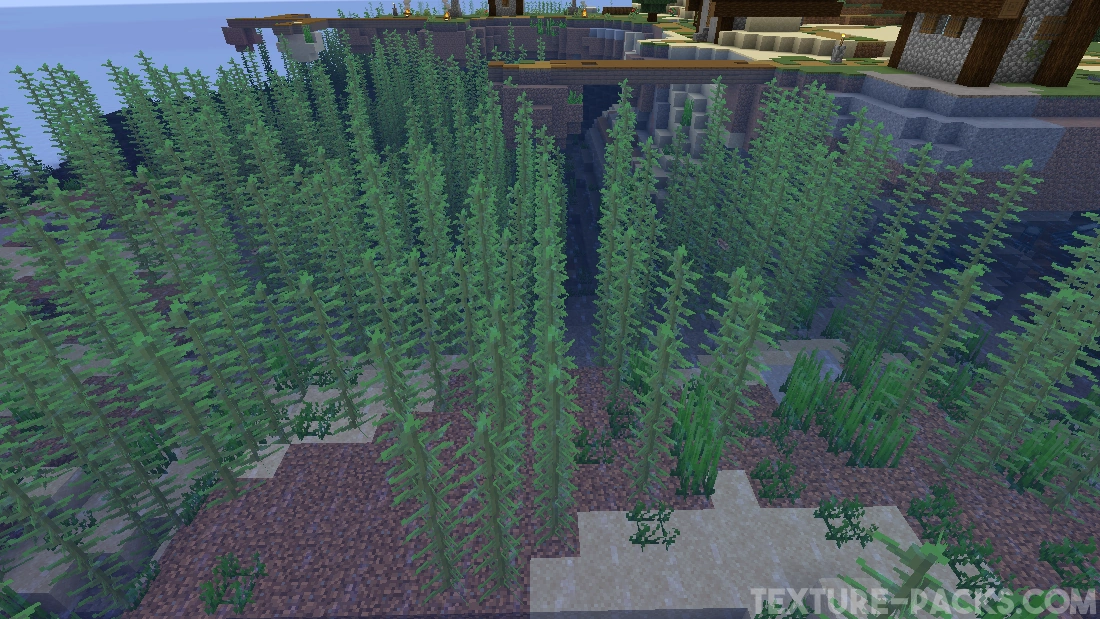
Comparison
Use our comparison tool to compare the Minecraft default pack with Clear Water.


How To Install Clear Water Texture Pack
Here’s a tutorial on installing Clear Water in Minecraft Java Edition. If you’re using Minecraft Bedrock Edition and the pack is available for Bedrock/MCPE, you can simply click on the downloaded file to install it.
- Download and install OptiFine, as it is required by most texture packs.
- Download the Clear Water texture pack for Minecraft from the file section below. Pick the file that matches your Minecraft edition and version.
- Launch Minecraft.
- Click "Options" on the main menu.
- In the options, go to the submenu “Resource Packs”.
- Click "Open Pack Folder" at the bottom left to see a folder titled "resourcepacks".
- Put the downloaded ZIP file into your "resourcepacks" folder. Or, just drag and drop it into the Minecraft window to add the pack.
- You will see the pack on the left side of the resource pack selection menu. Unzip the file if you can't see the pack.
- Hover over the pack thumbnail and click the arrow pointing right. If the game notifies you that the pack is made for a newer or older Minecraft version, simply click “Yes” to proceed. Most textures will still work.
- Click "Done" and all assets have been loaded.
Clear Water Texture Pack Download
[MCPACK] [Vibrant Visuals] Download Clear Water Texture Pack
[MCPACK] [Fancy & Simple] Download Clear Water Texture Pack
Java Edition:
[16x] Download Clear Water Texture Pack

Thank you!
niceccc oh my gosh