This Invisible Armor Model Texture Pack download page is not affiliated with or maintained by the original creator. All download links will redirect you to the officially maintained download pages.
The pack makes all armor and trims fully transparent, allowing your Minecraft skin and outfit to shine through without the bulky look of armor. It focuses purely on visuals and does not affect FPS or overall performance in any way. The pack simply removes the armor models while keeping all protection stats intact, ensuring your game looks cleaner without changing how smoothly it runs.
In your inventory, armor items remain fully visible, so you can still manage and equip them as usual. And while the pack seamlessly handles most armor visuals, it doesn’t affect elytra’s, turtle shells, or the armor on pets like dogs and horses, preserving those features as is. Definitely the best part is that the pack is freely available for both the Java Edition and Bedrock Edition (Minecraft PE), making it accessible no matter which platform you play.
We ran a community poll to find out why players are drawn to invisible armor in Minecraft. The most popular reason? Many gamers feel it helps with role-playing by keeping skins visible. Imagine an RPG scenario on a realm, like creating a dynamic city for a YouTube video: each character—from police officers to robbers and passersby—can be instantly recognizable by their outfits without gear covering up their unique look.
Another fun use of the Invisible Armor Model Texture Pack is to throw off your fellow players with a bit of confusion. As a server owner, you can use this pack to troll your friends by enabling it as a server resource pack. Players won’t be able to tell if opponents are decked out in netherite or wearing a weak leather set. For this to work in PvP, though, everyone on the server needs to either install the texture pack individually or the server owner must enable it globally in the settings.
Overall, the pack isn’t your classic graphics mod with widespread cosmetic upgrades. Instead, it’s a small tweak that focuses exclusively on one category of items. We’ve reviewed something similar before called the Invisible Item Frames Texture Pack, which is fantastic for decorating. With this, you can place items seamlessly on walls, shelves, or tables. Scroll down now to grab the download links!
Invisible Armor Model was released on November 13, 2021 and is compatible with these Minecraft versions: 26.2 - 26.1.2 - 26.1.1 - 26.1 - 1.21.11 - 1.21.10 - 1.21.9 - 1.21.8 - 1.21.7 - 1.21.6 - 1.21.5 - 1.21.4 - 1.21.3 - 1.21.2 - 1.21.1 - 1.21 - 1.20.6 - 1.20.5 - 1.20.4 - 1.20.3 - 1.20.2 - 1.20.1 - 1.20 - 1.19.4 - 1.19.3 - 1.19.2 - 1.19.1 - 1.19 - 1.18.2 - 1.18.1 - 1.18 - 1.17.1 - 1.17 - 1.16.5 - 1.16.4 - 1.16.3 - 1.16 - 1.15.2 - 1.15 - 1.14.4 - 1.14 - 1.13.2 - 1.13 - 1.12.2 - 1.12 - 1.11.2 - 1.11 - 1.10.2 - 1.10 - 1.9.4 - 1.9 - 1.8.9 - 1.8 - 1.7.10 - 1.7.2 - 1.6.4
Video & Screenshots
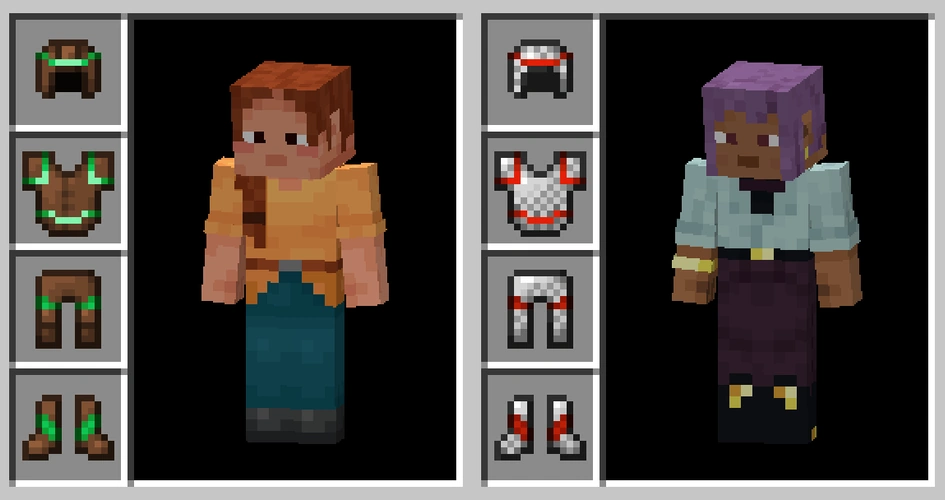
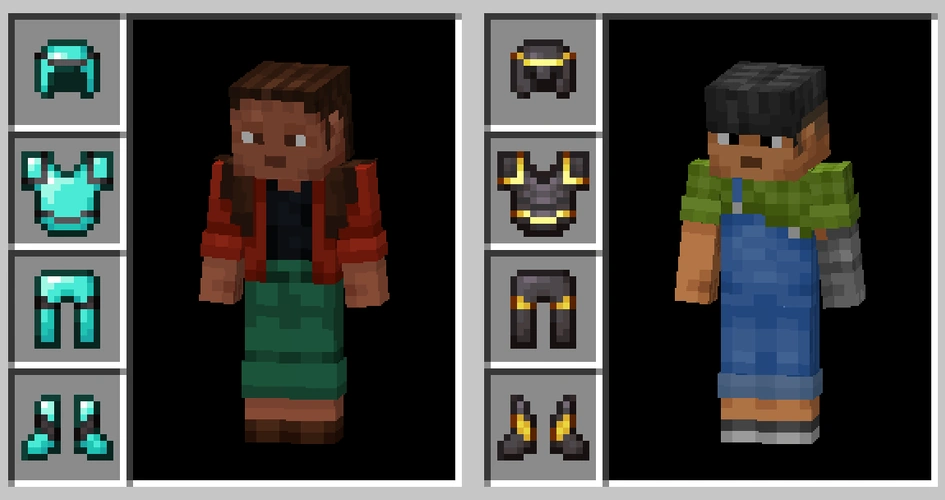
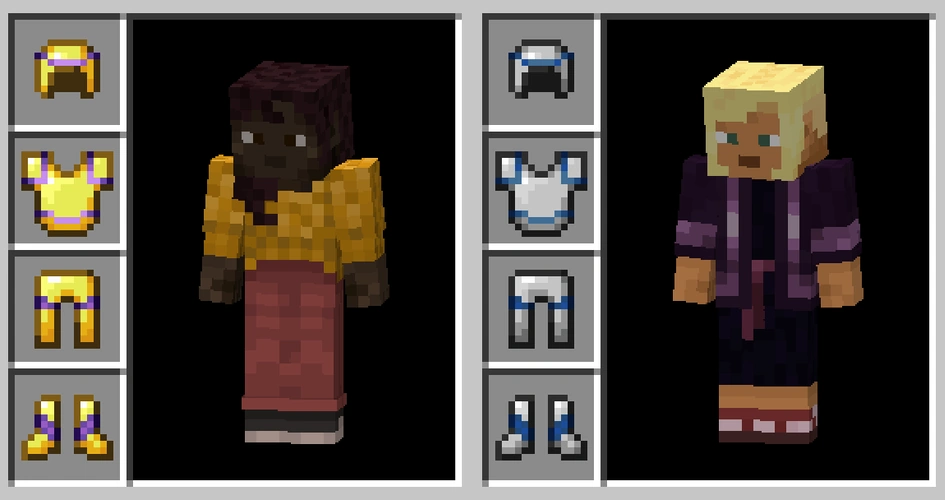
Comparison
Use our comparison tool to compare the Minecraft default pack with Invisible Armor Model.


How To Install Invisible Armor Model Texture Pack
Here’s a tutorial on installing Invisible Armor Model in Minecraft Java Edition. If you’re using Minecraft Bedrock Edition and the pack is available for Bedrock/MCPE, you can simply click on the downloaded file to install it.
- Download the Invisible Armor Model texture pack for Minecraft from the file section below. Pick the file that matches your Minecraft edition and version.
- Launch Minecraft.
- Click "Options" on the main menu.
- In the options, go to the submenu “Resource Packs”.
- Click "Open Pack Folder" at the bottom left to see a folder titled "resourcepacks".
- Put the downloaded ZIP file into your "resourcepacks" folder. Or, just drag and drop it into the Minecraft window to add the pack.
- You will see the pack on the left side of the resource pack selection menu. Unzip the file if you can't see the pack.
- Hover over the pack thumbnail and click the arrow pointing right.
If the game notifies you that the pack is made for a newer or older Minecraft version, simply click “Yes” to proceed. Most textures will still work.
- Click "Done" and all assets have been loaded.
Removed Armor:
- Leather
- Chainmail
- Copper
- Gold
- Iron
- Diamond
- Netherite
Invisible Armor Model Texture Pack Download
[16x] Download Invisible Armor Model Texture Pack
Java Edition:
[16x] [26.2.x] Download Invisible Armor Model Texture Pack
[16x] [26.1.x] Download Invisible Armor Model Texture Pack
[16x] [1.21.11] Download Invisible Armor Model Texture Pack
[16x] [1.21.10 – 1.21.9] Download Invisible Armor Model Texture Pack
[16x] [1.21.8 – 1.21.7] Download Invisible Armor Model Texture Pack
[16x] [1.21.6] Download Invisible Armor Model Texture Pack
[16x] [1.21.5] Download Invisible Armor Model Texture Pack
[16x] [1.21.4] Download Invisible Armor Model Texture Pack
[16x] [1.21.3 – 1.21.2] Download Invisible Armor Model Texture Pack
[16x] [1.21.1 – 1.21] Download Invisible Armor Model Texture Pack
[16x] [1.20.6 – 1.20.5] Download Invisible Armor Model Texture Pack
[16x] [1.20.4 – 1.20.3] Download Invisible Armor Model Texture Pack
[16x] [1.20.2] Download Invisible Armor Model Texture Pack
[16x] [1.20.1 – 1.20] Download Invisible Armor Model Texture Pack
[16x] [1.19.4] Download Invisible Armor Model Texture Pack
[16x] [1.19.3] Download Invisible Armor Model Texture Pack
[16x] [1.19.2 – 1.19] Download Invisible Armor Model Texture Pack
[16x] [1.18.2 – 1.18] Download Invisible Armor Model Texture Pack
[16x] [1.17.1 – 1.17] Download Invisible Armor Model Texture Pack
[16x] [1.16.5 – 1.16.2] Download Invisible Armor Model Texture Pack
[16x] [1.16.1 – 1.15] Download Invisible Armor Model Texture Pack
[16x] [1.14.4 – 1.13] Download Invisible Armor Model Texture Pack
[16x] [1.12.2 – 1.11] Download Invisible Armor Model Texture Pack
[16x] [1.10.2 – 1.9] Download Invisible Armor Model Texture Pack
[16x] [1.8.9 – 1.6.1] Download Invisible Armor Model Texture Pack
