If you like building with glass in Minecraft, you know exactly what we’re talking about. You place block after block to create a massive glass wall for your modern house, step back to admire your work, and all you see is a grid of annoying lines ruining the entire view. The Borderless Glass Texture Pack fixes exactly that, and we can promise you this: once you’ve tried it, you’ll never go back.
Every glass block in Minecraft has a clearly visible border in its default texture. Those dark edges are meant to give the block some structure, but with transparent blocks, it quickly becomes an eyesore. As soon as you place multiple glass blocks next to each other, you end up with a dense checkerboard pattern. On a large window front or glass roof, it looks terrible because instead of a clear view, all you notice are texture borders.
It gets especially frustrating when you actually want to look through the glass at something. A glass floor observation deck over a ravine, for example, is supposed to make you feel the depth and give you that rush of excitement. But with the default glass, you’re mostly staring at a stripe pattern instead of the stunning landscape below.
What Does the Borderless Glass Texture Pack Do?
The concept is dead simple: the pack completely removes the visible block borders between glass blocks. Instead of a grid pattern, you get smooth Minecraft transparent glass that actually looks realistic. Real windows don’t have thick dividing lines between them, after all.
The vanilla feel stays completely intact. The colors are identical, the resolution stays at 16×16 pixels making it a true clear glass pack, and the glass blends seamlessly into your world.
The Difference from Clear Glass Packs
Here’s where it gets a little technical. Many clear glass packs for Minecraft use connected textures, where neighboring glass blocks blend their textures together. The problem? Minecraft doesn’t support this feature out of the box. You absolutely need OptiFine or the Continuity mod for that.
The Borderless Glass Texture Pack takes a different approach. Instead of relying on connected textures, it changes the base texture of each individual glass block. Every single block comes without borders on its own. That’s why the pack works completely without mods in pure vanilla Minecraft, making it a real no border glass alternative that doesn’t need OptiFine.
This matters more than you might think. If you play snapshots or new full releases, you know OptiFine often takes weeks to update. With Borderless Glass, you still get Minecraft glass without lines right away in any version. On servers without mod support, resource packs like this are allowed since they only change your local view. That’s different from packs like XRay, which are banned on most servers and Realms.
The difference in results: with classic clear glass packs, the inner texture borders merge together, but the outer frame of the entire glass surface often stays visible. The Borderless Glass Texture Pack removes absolutely all borders, both between blocks and on the outer edges. And if you’re playing on a weaker device, every saved resource counts, while this pack has virtually no impact on performance.
Why Players Love Borderless Glass
We still remember our first big survival project with a glass roof on a server. We spent days building a mountain base that was supposed to offer a clear view of the night sky. The result was honestly disappointing because instead of stars and northern lights with shaders, all we saw was a grid of dark lines. The moment we downloaded and activated the Borderless Glass Pack was an absolute game-changer. Suddenly we could actually see everything outside our base perfectly.
Your builds will definitely look more open and cohesive with this pack too. Those ugly stripe patterns disappear completely. Once you’ve built and seen a structure with borderless glass, the vanilla textures will bug you in every other build. You could build modern skyscrapers, for instance, which often have huge glass facades that look so much better with the Borderless Glass Pack. You can really go all out architecturally with panorama windows.
Anyone who builds floating islands or sky bases already knows how cool a transparent floor can be. With Borderless Glass, that effect really comes through because your view drops straight down without anything blocking it. Same goes for greenhouses and glass domes where sunlight now pours through without any visual interruption. Even historical building styles benefit: large church windows or the glass elements of a castle look way more elegant without that blocky pattern. But you’ll probably notice the strongest effect underwater. Aquariums and underwater bases gain a ton of atmosphere because you can watch fish, coral, and the open ocean without texture borders cutting through the image.
Beyond the looks, there are real gameplay advantages. When building, you get a much clearer view, and zombies can’t jump scare you as easily because you spot them right away. For screenshots and videos, houses with transparent glass look way more professional, which matters if you’re a content creator on Reddit or TikTok.
Bedrock Edition and Compatibility
The creator also thought about the Bedrock community. The separate Minecraft Bedrock Borderless Glass version works on phones, tablets, Xbox, and PlayStation. Your device just needs to support custom textures from the internet. The pack isn’t available in the Marketplace, but manual installation is straightforward. We’ll walk you through it in the guide below.
Compatibility with other packs is excellent too. Since only the glass textures are changed, you can load Borderless Glass on top of your favorite resource pack. On Java Edition, you can also play with shaders like SEUS, BSL, or Complementary without any issues. Now you know everything important about this pack and you’re ready to start the download!
Borderless Glass was released on January 24, 2023 and is compatible with these Minecraft versions: 26.2 - 26.1.2 - 26.1.1 - 26.1 - 1.21.11 - 1.21.10 - 1.21.9 - 1.21.8 - 1.21.7 - 1.21.6 - 1.21.5 - 1.21.4 - 1.21.3 - 1.21.2 - 1.21.1 - 1.21 - 1.20.6 - 1.20.5 - 1.20.4 - 1.20.3 - 1.20.2 - 1.20.1 - 1.20 - 1.19.4 - 1.19.3 - 1.19.2 - 1.19.1 - 1.19 - 1.18.2 - 1.18.1 - 1.18 - 1.17.1 - 1.17 - 1.16.5 - 1.16.4 - 1.16.3 - 1.16 - 1.15.2 - 1.15 - 1.14.4 - 1.14 - 1.13.2 - 1.13 - 1.12.2 - 1.12 - 1.11.2 - 1.11 - 1.10.2 - 1.10 - 1.9.4 - 1.9 - 1.8.9 - 1.8 - 1.7.10 - 1.7.2 - 1.6.4
Video & Screenshots

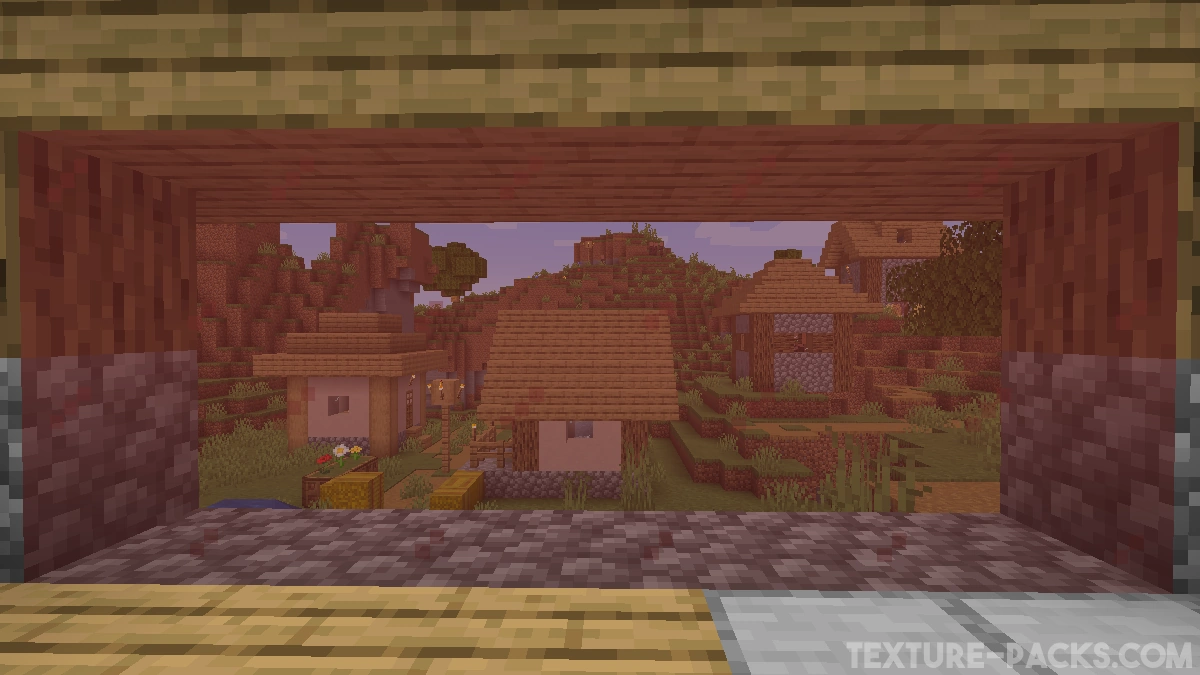
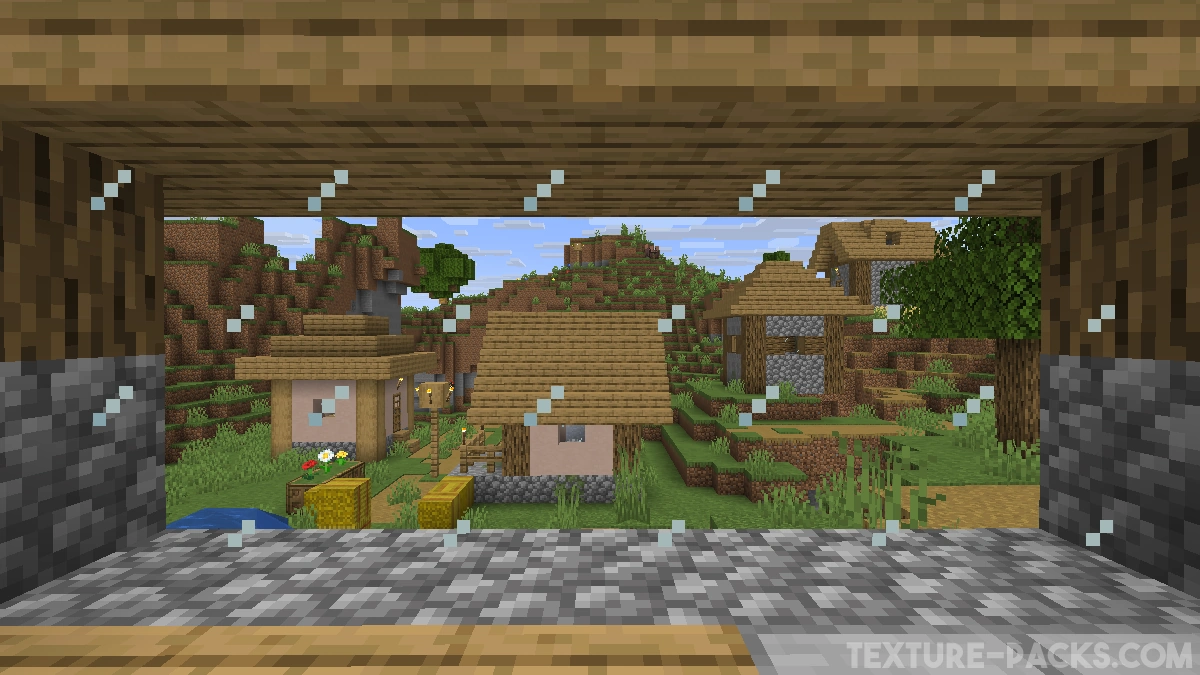
Comparison
Use our comparison tool to compare the Minecraft default pack with Borderless Glass.


How To Install Borderless Glass Texture Pack
Here’s a tutorial on installing Borderless Glass in Minecraft Java Edition. If you’re using Minecraft Bedrock Edition and the pack is available for Bedrock/MCPE, you can simply click on the downloaded file to install it.
- Download the Borderless Glass texture pack for Minecraft from the file section below. Pick the file that matches your Minecraft edition and version.
- Launch Minecraft.
- Click "Options" on the main menu.
- In the options, go to the submenu “Resource Packs”.
- Click "Open Pack Folder" at the bottom left to see a folder titled "resourcepacks".
- Put the downloaded ZIP file into your "resourcepacks" folder. Or, just drag and drop it into the Minecraft window to add the pack.
- You will see the pack on the left side of the resource pack selection menu. Unzip the file if you can't see the pack.
- Hover over the pack thumbnail and click the arrow pointing right.
If the game notifies you that the pack is made for a newer or older Minecraft version, simply click “Yes” to proceed. Most textures will still work.
- Click "Done" and all assets have been loaded.
Borderless Glass Texture Pack Download
[MCPACK] Download Borderless Glass Texture Pack
Java Edition:
[16x] [26.2.x] Download Borderless Glass Texture Pack
[16x] [26.1.x] Download Borderless Glass Texture Pack
[16x] [1.21.11] Download Borderless Glass Texture Pack
[16x] [1.21.10 – 1.21.9] Download Borderless Glass Texture Pack
[16x] [1.21.8 – 1.21.7] Download Borderless Glass Texture Pack
[16x] [1.21.6] Download Borderless Glass Texture Pack
[16x] [1.21.5] Download Borderless Glass Texture Pack
[16x] [1.21.4] Download Borderless Glass Texture Pack
[16x] [1.21.3 – 1.21.2] Download Borderless Glass Texture Pack
[16x] [1.21.1 – 1.21] Download Borderless Glass Texture Pack
[16x] [1.20.6 – 1.20.5] Download Borderless Glass Texture Pack
[16x] [1.20.4 – 1.20.3] Download Borderless Glass Texture Pack
[16x] [1.20.2] Download Borderless Glass Texture Pack
[16x] [1.20.1 – 1.20] Download Borderless Glass Texture Pack
[16x] [1.18.2 – 1.18] Download Borderless Glass Texture Pack
[16x] [1.17.1- 1.17] Download Borderless Glass Texture Pack
[16x] [1.16.5- 1.16.2] Download Borderless Glass Texture Pack
[16x] [1.16.1 – 1.15] Download Borderless Glass Texture Pack
[16x] [1.14.4 – 1.13] Download Borderless Glass Texture Pack
[16x] [1.12.2 – 1.11] Download Borderless Glass Texture Pack
[16x] [1.10.2 – 1.9] Download Borderless Glass Texture Pack
[16x] [1.8.9 – 1.6.1] Download Borderless Glass Texture Pack

I want the glass in Minecraft to be smooth, without any lines
Just download the pack and you will get it